By /robex/, August 2026. Back to Articles and Guides
Cue Club is a pool and snooker game originally released by Bulldog Interactive for Windows on November 2000. I am a big fan of cue sports, and I find it surprising and disappointing that no modern pool games seem to be as fun as this old gem. Even though it has an overhead view of the pool table the physics are just way more satisfying than any 3D view pool games that I have tried.
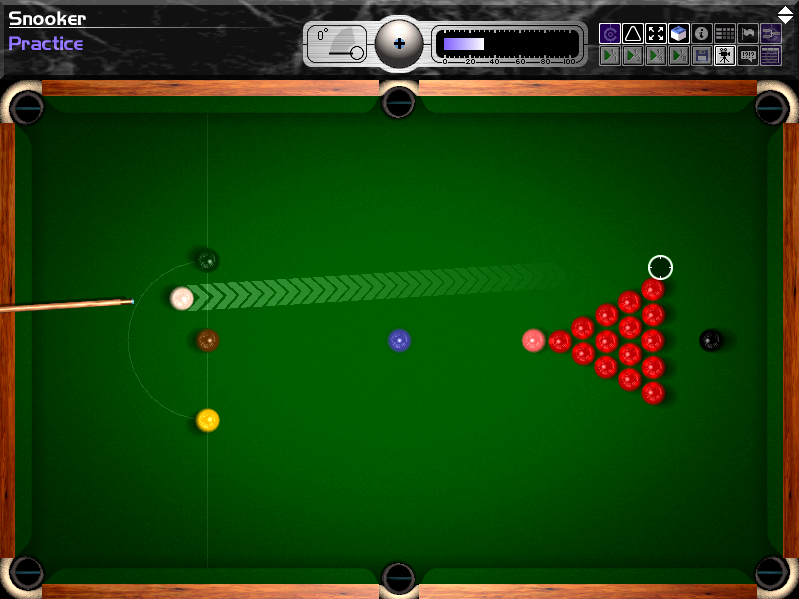
Fast forward a decade or two from its release, and on a modern gaming mouse I was sad to find out the input would not work properly in the game. The mouse would just jitter in place unless I moved it excruciatingly slowly. In this article we will find the root cause and fix it by patching the game executable.
Initially, I just thought the game was old and would not run properly on modern systems at all, due to hardcoded constants or just lack of support for modern libraries. At some point after basic futile troubleshooting, I had the bright idea to try to plug in an old crappy optical mouse, and much to my surprise, that fixed the input problems completely and the game was playable again.
I had some fun playing snooker, but the reverse engineer in me was really curious about what could be causing this. After some thought (and trying various mice), I figured out the only difference from the game's standpoint between the old mouse and my fancy gaming one was the polling rate (125Hz vs 1000Hz). Looking at the imports, we can see the game uses DirectX 7 with DirectInput.
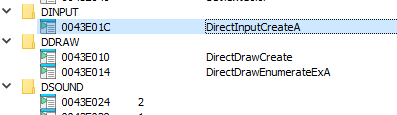
Doing some searching, I found nothing about that alone suggests there should be problems with a high polling rate, so it was time to dig a bit deeper.
Note: only the relevant parts of the assembly/decompiled source code have been beautified, most of it is as-is from the decompilation output (I was lazy).
Given that the mouse kind of worked when moving it really slowly but just jittered in place if it was moved very fast, I assumed it was some sort of overflow happening due to receiving more events than it could handle, more than it being tied to the FPS. The first place to look is the function calling DirectInputCreateA, which returns a IDirectInput interface pointer.
Looking at the code, we find some interesting calls, in particular, at vtable offset 40 we find a call to GetDeviceData which suggests the game is using buffered input to read mouse data. Moreover, it points us to the structure that holds the data and shows that the game is requesting buffered input in chunks of 16 (the first parameter). If the game is running at 30 FPS, a mouse with a polling rate of 1000Hz could easily be causing the queue to not be drained fast enough if read only in 16 object chunks.
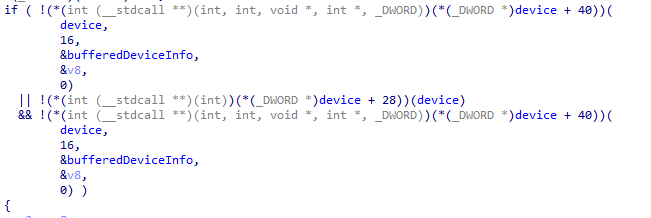
Unfortunately, we may not be able to easily patch this value because there may not be enough space allocated for a bigger buffer. Also this would be pointless if the device's input buffer size is not large enough (no point in trying to read 32 objects if the device only holds 16), so the next step is to check the value that is being set for the property DIPROP_BUFFERSIZE (the device's input buffer size, consult Microsoft's documentation if you are curious about the boring details). To find it, we need to look for references to the SetProperty function, and we find it right after the device initialization.

A value of 1 indicates the property being set is DIPROP_BUFFERSIZE, and looking at the data at the address of propertyObj (which is a DIPROPDWORD struct), we find the value is set to 16 (0x10).
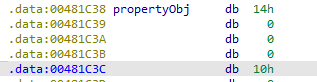
Patching this to a higher value should solve the issue, so lets try it. I tried a value of 1024 to have enough room for even higher polling rates, and surely enough, the game now started registering mouse input better, however now there was a noticeable delay between physically moving the mouse and seeing the cursor move on the screen. This is a step in the right direction, but it shows that clearly the game is not reading the input buffer fast enough.
Looking at the buffer used in the GetDeviceData call mentioned before, there is fortunately some extra room after the buffer to not cause any sort of nasty buffer overflows, so I patched the value of the pdwInOut parameter (number of elements to read from the input buffer) from 16 to 128.
I was fully expecting this to make it work properly, but I got partially disappointed. The mouse was now responsive, but the movement was very jittery and erratic. I was out of ideas in the DirectInput configuration domain, and after many game crashes and glitches, I started looking for how the game handles the input it receives from the aforementioned GetDeviceData function.
Looking at the mouse input handling code, we find a switch statement that handles the batch data received when moving the mouse or pressing the different buttons. We are only interested in the X and Y coords here, each iteration of the following loop goes over a single mouse delta event, e.g. in the X direction you would get +2, +3, +1, +4, etc. for all 128 (originally 16) retrieved events.
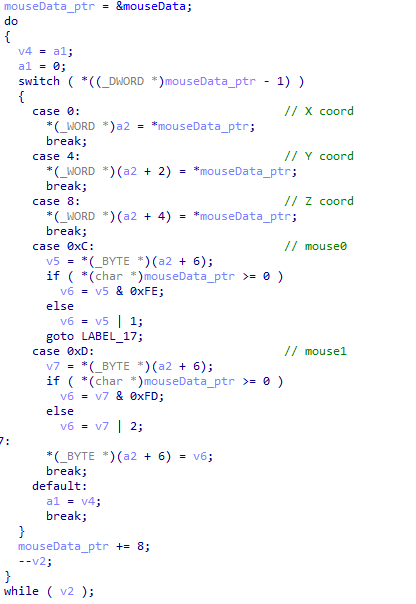
It may be somewhat evasive, but after looking for long enough I realized the function is completely discarding all events except the last one, as it overwrites the value in every iteration of the loop. This is more easily seen in the disassembly (corresponding to the lines after "case 0" and "case 4"):
0042D362  66 8B 08       mov cx,[eax]		; x delta
0042D365  66 89 0E       mov [esi],cx

0042D36A  66 8B 08       mov cx,[eax]		; y delta
0042D36D  66 89 4E 02    mov [esi+2],cx
The next logical attempt was to sum these values instead of assigning them, thankfully the assembly here allows for easy replacement without altering the total instruction size, so the instructions become:
0042D362  66 8B 08       mov cx,[eax]		; x delta
0042D365  66 01 0E       add [esi],cx

0042D36A  66 8B 08       mov cx,[eax]		; y delta
0042D36D  66 01 4E 02    add [esi+2],cx
Afterwards, I booted the game, and to my surprise, the mouse input was completely fixed and working great with my 1000Hz polling rate mouse!
OFFSET 0x2d2cb: 8 bytes    // GetDeviceData count (16 -> 128)
before: C7 44 24 08 10 00 00 00
after:  C7 44 24 08 80 00 00 00

OFFSET 0x2d362: 6 bytes	   // sum X delta instead of only last
before: 66 8B 08 66 89 0E
after:  66 8B 08 66 01 0E

OFFSET 0x2d36a: 7 bytes    // sum Y delta instead of only last
before: 66 8B 08 66 89 4E 02
after:  66 8B 08 66 01 4E 02

OFFSET 0x81c48: 4 bytes    // DIPROP_BUFFERSIZE (16 -> 1024)
before: 10 00 00 00
after:  00 04 00 00
After careful inspection, we found out this was actually 3 problems working together to cause mouse input issues most noticeable on high polling rate mice. To recap, the issues were: